Turn Any Website into a Single LLM-Ready Markdown File
Paste a website URL, sitemap, or feed URL. SiteToMarkdown follows docs paths, XML sitemaps, and RSS or Atom feeds, strips out the noise, and gives you one clean Markdown file for NotebookLM, ChatGPT, Claude Code, GitHub Copilot, and RAG pipelines.
- Flexible discovery – Start from docs paths, sitemap indexes, RSS, Atom, or JSON feeds
- Clean Markdown – No HTML, nav, or ads
- Works on tricky sites – Handles JS & bot-blocking
Convert a Site to Markdown
Login with Google in seconds. No password required.
Works great with
Stop feeding your LLM a single page. Start from a docs path, sitemap, or feed and give it one structured source.
Why Pasting URLs into LLMs Doesn't Work Well
LLMs only see a slice
Pasting one URL into ChatGPT, Claude, or NotebookLM gives shallow coverage. Most docs live across dozens or hundreds of pages.
Bots get blocked
Many docs sites block generic bots or rely on heavy JavaScript. Your AI tool never sees the real content.
Manual copy-paste fails
Adding pages to NotebookLM or RAG context one by one is slow, error-prone, and hard to keep updated.
SiteToMarkdown can start from a docs path, XML sitemap, RSS feed, Atom feed, or JSON feed, then collect the linked content into one Markdown file.
From Docs URL, Sitemap, or Feed to LLM Source in Under 5 Minutes
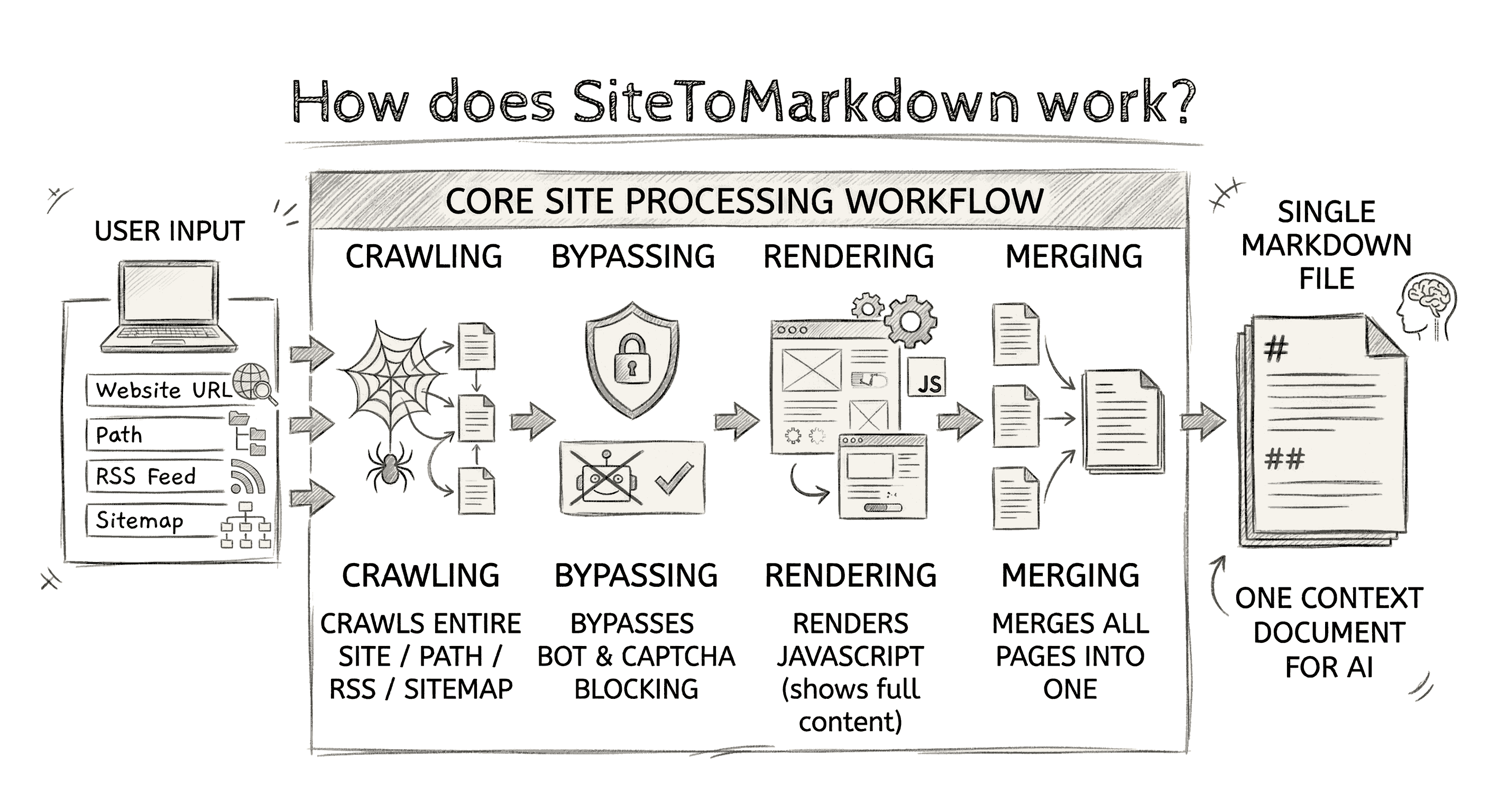
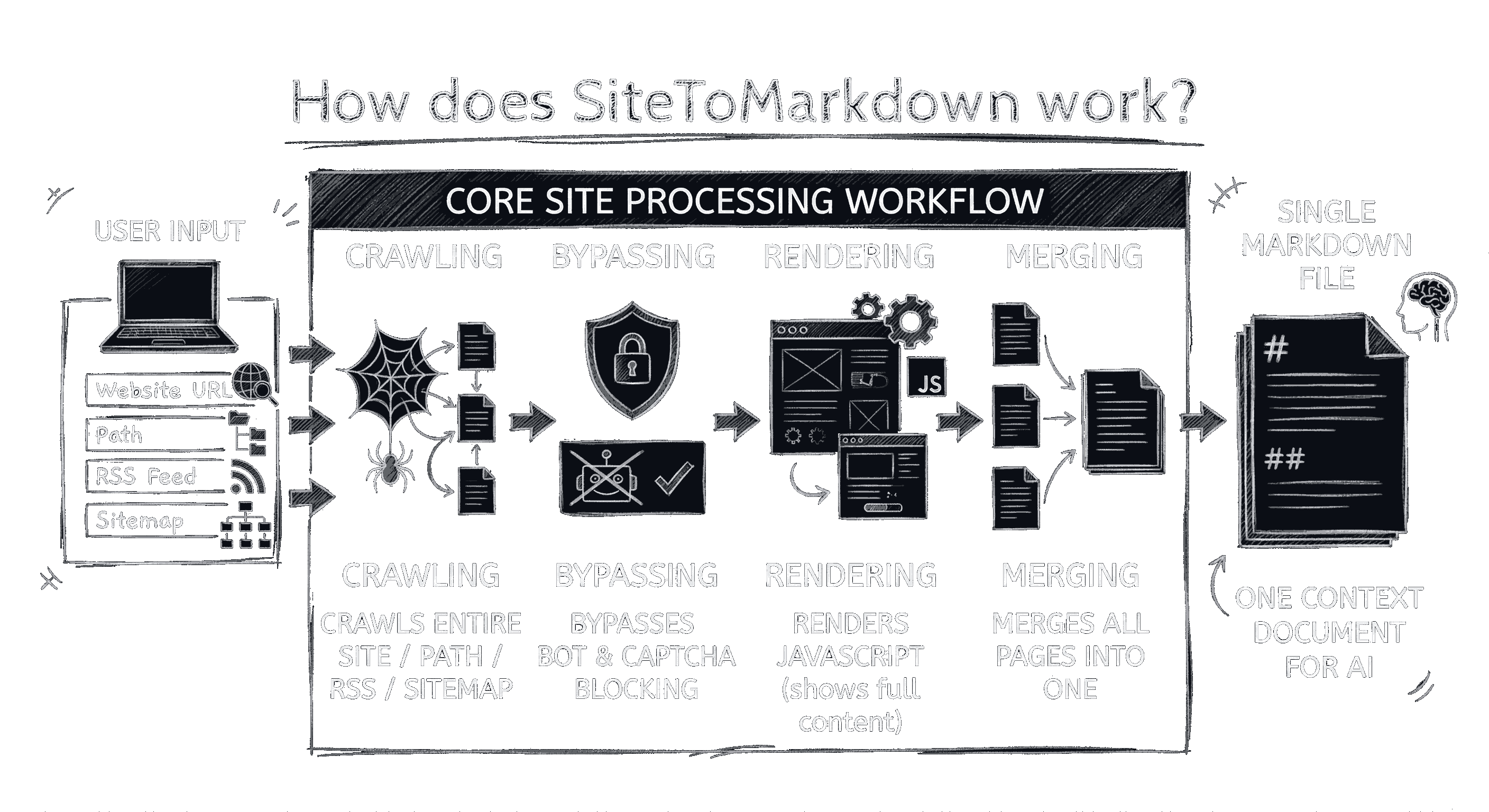
Paste a docs URL, sitemap, or feed
Enter https://yourdomain.com/docs/, /sitemap.xml, or an RSS or Atom feed URL.
We crawl & clean
We discover linked pages, render JS where needed, bypass blocking, and extract only the main content.
Download Markdown
Upload it to NotebookLM, ChatGPT, Copilot, or your RAG app as a single source.
For Developers
Automate Site-to-Markdown in Your Product
Building internal tools, assistants, or scheduled pipelines? Use the SiteToMarkdown API to submit docs URLs, monitor conversion status, and fetch clean Markdown artifacts programmatically.
Typical API workflow
- Submit a docs URL with
POST /api/v1/conversions. - Poll conversion status until ready or complete.
- Download one consolidated Markdown file for your app or pipeline.
Ideal for nightly refresh jobs, CI workflows, and product-side knowledge sync.
Built for the Way You Use LLMs

For NotebookLM
Turn entire docs sites into a single NotebookLM source for deep product questions.
Learn more →
For ChatGPT
Upload one Markdown file instead of pasting URLs. Get accurate, docs-grounded answers.
Learn more →
For GitHub Copilot
Keep a Markdown file in your repo. Copilot uses it to suggest up-to-date API calls.
Learn more →
For Claude Code
Use generated Markdown docs with CLAUDE.md and scoped rules for reliable, current code guidance.
Learn more →
For RAG & Agents
Give your agents a clean, portable knowledge source instead of building custom scrapers.
Learn more →Simple Pay-As-You-Go Pricing
No subscriptions. Just pay for what you convert.
- $0.04 per page
- Docs paths, sitemap, RSS, Atom, and JSON feed support
- Instant access for cached conversions after confirmation
- JS rendering
- Advanced bot bypass
- Clean Markdown: No ads, navigation, or irrelevant content
Try It Free with Popular Docs Sites
Frequently Asked Questions
What exactly does SiteToMarkdown do?
SiteToMarkdown converts an entire docs-style site into one clean, LLM-ready Markdown file. Start from a docs path, sitemap, or feed URL, and we discover linked pages, extract the main content, remove noise, and merge everything into a single structured export.
Does it only work with NotebookLM?
No. The output is standard Markdown, so it works with Google NotebookLM, ChatGPT and other file-based LLM workflows, GitHub Copilot (including Agents), and RAG pipelines.
Can I automate conversions with an API?
Yes. Use the SiteToMarkdown API to submit conversion jobs, monitor status, and download Markdown files programmatically. This works well for scheduled docs refreshes, developer tooling, and integration into existing ingestion pipelines.
What types of URLs work best?
Documentation sites, help centers, knowledge bases, XML sitemaps, and feed URLs work best. You can start from a docs root like
/docs/ or /help/, a sitemap such as /sitemap.xml, or an RSS, Atom, or JSON feed URL.
Do sitemaps and feeds work?
Yes. SiteToMarkdown supports XML sitemaps and common feed formats including RSS, Atom, and JSON Feed. If feed entries point to pages on the same site, we can use them as the crawl source automatically.
How do you discover pages from a docs URL?
You can start from a docs path, sitemap, or feed. From there, SiteToMarkdown follows the docs structure to collect the relevant linked pages and turn them into one cohesive Markdown file.
How do you handle JS-rendered docs and tricky sites?
We use headless browsers to render JavaScript before extraction, which helps on Single Page Applications (SPAs) like React or Vue. We also handle many bot-blocking and “tricky” docs sites so you get the real content, not an empty shell.
Will the Markdown include nav, headers, footers, or ads?
The goal is clean, readable Markdown focused on the main page content—not navigation, site chrome, or ads. Exact results can vary by site, but the output is designed for LLM context (dense and low-noise), not as an HTML dump.
Why is Markdown better than pasting URLs or ingesting raw HTML for RAG?
Markdown preserves structure (headings), stays token-efficient (no <div> soup), and keeps code blocks intact.
That makes it easier to split into chunks, embed, and retrieve accurately in RAG pipelines—and more reliable than pasting one URL at a time into an LLM.
How do I use it with GitHub Copilot Agents?
Convert a docs site (e.g., Tailwind, Stripe, Next.js, OpenAI, or your own API), then commit the Markdown file into your repo (often under docs/).
In Copilot Chat, reference it with #-mentions (and combine with @workspace / #codebase) so Copilot Agents use the latest docs as high-quality context.
What if NotebookLM can’t import my site due to domain restrictions?
If NotebookLM rejects a webpage or even a feed URL (e.g., “Unable to import this webpage due to domain restrictions”), SiteToMarkdown can often still fetch the content and deliver it as a single Markdown file you can upload as one source.
How does pricing work?
No subscriptions. Buy credits in $5, $10, or $25 packs, then confirm a crawl when you're ready. Each billable page costs $0.04, and credits never expire.
Can I try it before converting my own docs?
Yes. You can download free pre-converted Markdown exports on Free Downloads (for example: Tailwind CSS docs, OpenAI API overview, and X API docs) to test your NotebookLM, ChatGPT, Copilot, or RAG workflow.
Do I need to install anything?
No. SiteToMarkdown is entirely web-based—you paste a URL, convert, and download the final Markdown file.
How do I keep the Markdown up to date when docs change?
Re-run the same docs URL, sitemap, or feed in SiteToMarkdown, then replace the older Markdown file in your tool or repo. This is a simple way to keep NotebookLM sources, Copilot context files, and RAG datasets aligned with the latest docs.