
GitHub Copilot & SiteToMarkdown
Give Copilot Agents your real docs, not their training cutoff
SiteToMarkdown converts entire docs sites—like Tailwind CSS, Stripe, Next.js, OpenAI, and your own APIs—into a single, clean Markdown file you add to your workspace. GitHub Copilot Agents then use that file as high‑quality, up‑to‑date context when generating and editing code.
- Ground Copilot in the latest Tailwind, Stripe, and framework APIs—no more outdated suggestions.
-
Provide one Markdown file per library or service for easy
#‑mentioncontext. - Use context engineering best practices from VS Code: curated, concise, always-on documentation.
No subscriptions — pay only when you convert a site.
Copilot is only as good as the context you give it
GitHub Copilot Chat and Agents can pull in workspace context, use #‑mentions for files, and even #fetch URLs. But:
- Docs live across dozens or hundreds of pages (Tailwind, Stripe, Next.js, OpenAI, etc.). Fetching one URL at a time doesn’t give full coverage.
- Docs sites are often JS‑rendered, or block bots—Copilot’s web tools may not see full or current content.
- Manual copying into your repo is tedious, noisy (HTML, nav, ads), and bloats Copilot’s context window.
SiteToMarkdown gives you a single, clean Markdown file per docs site so Copilot Agents always have a concise, comprehensive reference in your workspace.
Copilot Chat context features you can combine with SiteToMarkdown
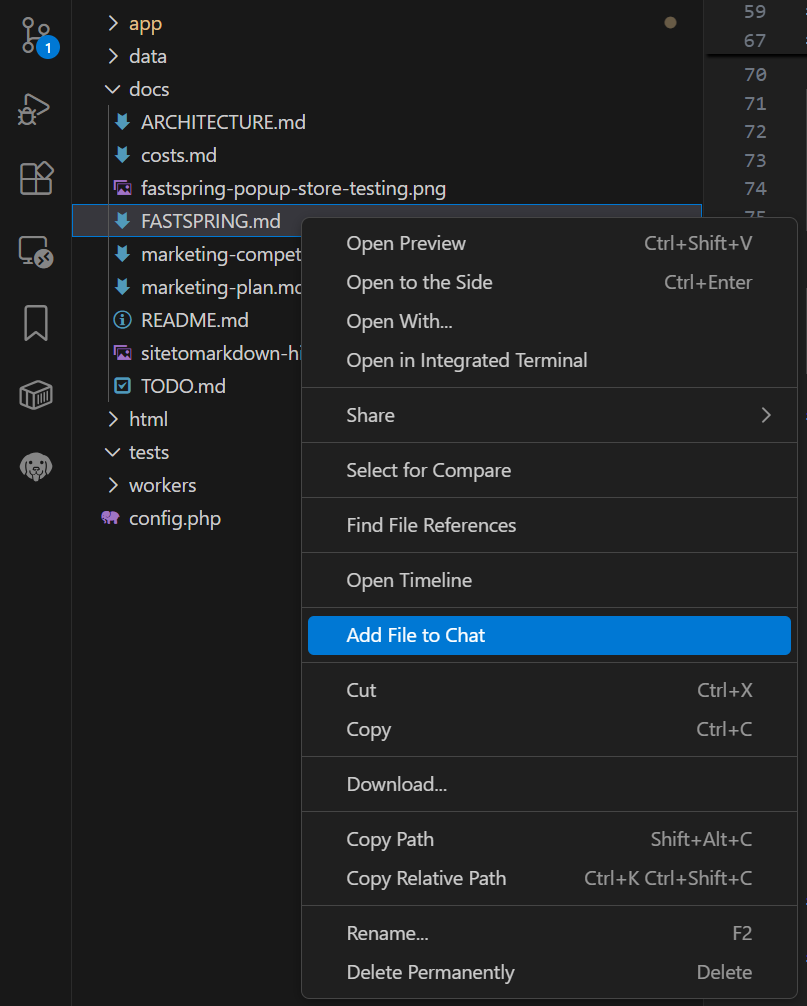
- #file-or-folder — reference your Markdown docs directly.
- #codebase — let Copilot search implementation code that uses those libraries.
- @workspace — ask workspace‑level questions grounded in your imported docs.
Based on VS Code’s “Manage context for AI” and “Context engineering” guides .
A simple flow: convert docs → add to repo → reference in Copilot chat
Use SiteToMarkdown as the “context loader” in your Copilot context engineering workflow. Curate the docs once, then let Copilot Agents reuse them across chats and tasks.
Step 1
Convert library docs with SiteToMarkdown
Paste the docs URL into SiteToMarkdown:
- https://tailwindcss.com/docs/
- https://stripe.com/docs/api
- https://nextjs.org/docs
- https://platform.openai.com/docs/overview
SiteToMarkdown crawls all pages, renders JS, bypasses basic blocking, and merges the main content into a single Markdown file—no HTML, nav, or ads.
Step 2
Add the Markdown file to your project
Commit the exported files into a docs/ or .github/ folder:
docs/
  tailwindcss.md
  stripe-api.md
  nextjs.md
.github/
  copilot-instructions.md
Reference these docs from .github/copilot-instructions.md so Copilot Agents see them as project‑wide context.
Step 3
Use Copilot Chat with curated docs context
In Copilot Chat, use #‑mentions and @workspace to bring your docs into the prompt:
"Suggest card layout classes for this component based on #docs/tailwindcss.md"

"Using #docs/stripe-api.md, implement a payment intent endpoint in this file"

"@workspace explain how authentication works in our API using #docs/openai-api.md"
Copilot’s context window focuses on clean Markdown, not noisy web pages, improving accuracy and reducing back‑and‑forth.
Use SiteToMarkdown in your Copilot context engineering workflow
VS Code’s context engineering guide recommends keeping curated project‑wide context in Markdown files and referencing them from .github/copilot-instructions.md. SiteToMarkdown makes it trivial to do this for external libraries and APIs you depend on.
Example: Tailwind CSS + Stripe in a Next.js project
Suppose your project uses Tailwind CSS for styling, Stripe for billing, and Next.js for routing:
- Convert Tailwind docs → docs/tailwindcss.md
- Convert Stripe API docs → docs/stripe-api.md
- Convert Next.js docs → docs/nextjs.md
Then add them to your Copilot instructions:
# Project context

- Refer to [Tailwind CSS utilities](../docs/tailwindcss.md) for styling.
- Use [Stripe API](../docs/stripe-api.md) for payments; follow their latest best practices.
- Follow [Next.js routing conventions](../docs/nextjs.md) for pages and API routes.

If any generated code conflicts with these docs, prefer the docs.
Result: Copilot that “knows” your stack as it is today
With this setup, Copilot Agents can:
- Generate Tailwind classes that match the latest utilities and responsive variants.
- Use the current Stripe API endpoints, parameters, and webhooks flows.
- Follow Next.js’ current routing, app directory, and server component patterns.
- Search your codebase (#codebase) while grounded in the correct docs.
Over time, you can treat these Markdown files as living “external context layers” alongside your PRODUCT/ARCHITECTURE/CONTRIBUTING docs recommended in the context engineering guide.
Prompt examples for Copilot Chat with SiteToMarkdown docs
Once your Markdown docs are in the repo, you can explicitly bring them into Copilot Chat using #‑mentions and chat participants.
Tailwind CSS
"Using #docs/tailwindcss.md, propose responsive classes
for this layout so that cards don't break across columns."

"@workspace refactor this component's styling to use
Tailwind utilities based on our Tailwind docs in
#docs/tailwindcss.md."
Stripe API
"Based on #docs/stripe-api.md, implement an endpoint that
creates a PaymentIntent for this checkout flow."

"Review our existing Stripe integration code against
#docs/stripe-api.md and list any deprecated fields or
endpoints we are still using."
Next.js + OpenAI
"Using #docs/nextjs.md, migrate our pages router API route
to the app router convention."

"With #docs/openai-api.md as reference, add a streaming
chat endpoint that follows OpenAI's latest Responses API."
Custom APIs & internal docs
"Following our internal API spec in #docs/internal-api.md,
add a new endpoint and update the client SDK."

"@workspace check that the authentication flow in this
feature is consistent with #docs/auth-spec.md."
Automate Copilot docs context with the API
Use the SiteToMarkdown API to keep external docs Markdown files in sync for Copilot Agents.
- Schedule conversion jobs for dependency docs such as Stripe, Tailwind, or internal APIs.
- Replace markdown files under
docs/before developer workflows begin. - Let Copilot use fresher context in
#-mentionswith less manual upkeep.
Try ready-made Markdown docs with Copilot
Test this workflow without converting your own docs yet. Download one of our free exports and add it to a test project, then use it as Copilot context.
Free download
Tailwind CSS docs
186 pages converted into one Markdown file. Perfect for styling‑related Copilot prompts.
Free download
OpenAI API overview
55 pages as a single Markdown file for building AI features with Copilot assistance.

Free download
X (Twitter) API docs
12 pages of X API documentation, merged and cleaned for Copilot and other LLMs.